
Sending and receiving email... simple, right? You’ve done it a thousand times.
But what if we told you there’s a process running behind the scenes that, if you understand it, can make things even smoother. It might even save you some storage space, or help you dodge a virus or two.
We’re talking about email protocols.
Once you understand how they work, you’ll know which email protocol is best for your needs and how to adjust your setup to get the most out of it.
What is an email protocol?
Email protocols are the rules that servers and email clients use to send, receive and store emails. Without correctly implemented protocols, messages won't be sent or received correctly.
Compare them to languages in the real world. They serve as guidelines for mutual understanding. They define who is speaking to whom, how they're speaking, the rate at which they speak, how long they're speaking for, and whether what they're saying is encrypted.
Unlike WhatsApp, where every user communicates from a single WhatsApp account, email requires a system in place to facilitate communication across Email Service Providers (ESPs).
This is because there are tons of different ESPs. You may use Gmail, whilst your buddy is a fan of Outlook.
This is why email protocols are so essential. They provide a common language that allows email clients to communicate with each other. We’ll explain email protocol examples and types in more detail below, but essentially, you have three main protocols used in email: SMTP, IMAP, and POP3.
First, you have protocols involved in the sending process. When you send an email and write your “From” and “To” addresses on the metaphorical envelope, you then give it to the postie. SMTP is that postie.
SMTP uses the part before the '@' symbol to identify who the email is for and places it into that user's mailbox, or rejects it if the user doesn’t exist. The recipient then needs a way to download the email from the server. This is where IMAP and POP3 come in.
Once an email lands on your server via SMTP, you can then download it to your email client using POP3 or IMAP. These work differently in transferring your email from the server to your inbox, so it’s essential to choose the right combination for your needs.
Meet the main email protocols
Since the creation of email in the 1970s, it’s safe to say that email has been through a significant evolution.
The protocols below are a testament to that and are key to achieving the best possible email experience.
POP3 (Post Office Protocol 3)
POP3, or Post Office Protocol 3, works much like a traditional postal service. Once your letter arrives at the post office, it’s picked up and delivered to your house, regardless of whether you’re home to receive it or whether your dog tears it up the moment it hits the floor.
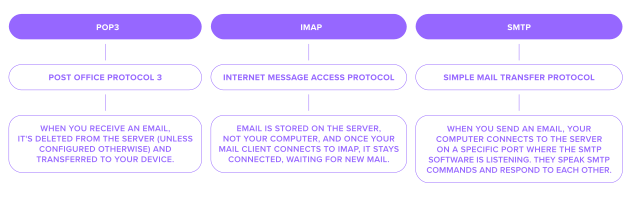
This is because POP stores email on your device and not on a server. When you receive an email, it's deleted from the server (unless configured otherwise) and transferred to your device. There may be some advantages to this approach, but it’s also not ideal.
First, the advantages.
The fact that the mail is being downloaded straight to your device means that when your internet is playing up, you don’t need to connect to an email server to read it. POP3 will connect when it can and download any available content. This means that you can access the email offline as it’s already stored on your computer.
But if you’re trying to keep pace with the modern world, this is where POP3 struggles.
Your mail client cannot inform the mailbox if you have read an email, marked it as unread, flagged it, or taken any other action. This is not ideal if you share a single mailbox with multiple users and you want your changes and mail status to be updated.
POP3 also deletes your email from the server before it drops it into your mailbox. This might be how the postie works, but in an email setting, it means that any backup you had of this email is now gone. That means if your finger slips on the delete button, or your laptop is broken, lost, or stolen, then so are any crucial emails you had stored on your device.
It also means that the responsibility for storage lies with you. With a shared server, your emails can be stored externally, saving you critical space on your home computer. With POP, this isn’t possible, which means you could find yourself running out of space pretty quickly.
IMAP (Internet Message Access Protocol)
If POP3 is the postie, IMAP is your private mailbox stored directly at the post office. Just pop down whenever you feel like it and take a peek at any unread mail.
Of course, with modern technology, this ‘trip to the post office’ takes less than a second, as it’s done virtually – but the idea remains the same. Email is stored on the server, not your computer, and once your mail client connects to IMAP, it stays connected, waiting for new mail.
IMAP is usually preferred over POP3, as it's much more practical for the modern era, where people often have multiple devices for reading email. This means if you connect a second IMAP client to the same mailbox, you'll see all the same messages with all the same folders.
A huge advantage here is that when transferring emails and folders between providers, IMAP can assist using a method called IMAP migration. Most business email services usually support this through their migration tools.
Once a recipient’s email client has connected to the server, all a user needs to do is click the header of an email, and it will be downloaded to the device. IMAP clients will typically copy some data to your local device for speed reasons, but this is optional. The client can set the email as read once it’s opened or move it to another folder, but the email remains on the server until deleted.
The trade-off with IMAP is that it relies on a stable internet connection, and storing everything on the server can eat into your storage limits if left unchecked. But in return, you get real-time sync, easier backups, and flexibility across devices.
SMTP (Simple Mail Transfer Protocol)
SMTP stands for Simple Mail Transfer Protocol. It is how the mail gets from Point A to Point B.
It is the protocol for sending email used by both email clients and servers.
So, how does it work?
When you send an email, your computer connects to the server on a specific port where the SMTP software is listening. They speak SMTP commands and respond to each other.
The server will validate the client, checking the username and password. It will then look at the sender address and the CC and BCC headers to determine the domains of the destination. It performs a domain lookup to find the MX record for that domain and then connects to this server using SMTP.
It will then take further steps to verify that the server is authorised to send emails on your behalf before accepting the email. Part of this process is scanning the email to check if it is spam or contains a virus. Once the email is received, it is placed into the receiving user's inbox, though some filters may be applied first if the user has configured them.
While SMTP is essential for getting your emails where they need to go, it doesn’t handle receiving or storing messages. That means it needs to be paired with a protocol like IMAP or POP3. It also relies heavily on correct configuration and authentication protocols to avoid delivery issues or spam filters.
Can you mix and match protocols?
Now, all this information is good in practice, but how do you get the most bang for your buck when setting up your email protocols?
As email protocols are split into two spheres – sending and receiving – it’s essential to make sure you have a setup that covers all the angles. Plus, If you're using a custom email domain, you're likely responsible for setting up or managing your email protocols manually.
The sending portion is most likely going to be covered by SMTP. This is usually a non-negotiable as it’s the modern standard for email.
The receiving portion offers more flexibility. And this is where you need to make a decision based on your use case.
IMAP paired with SMTP is usually the go-to setup for email. It gives users the flexibility to view their email from multiple devices and share status updates across their network. Think of shared email spaces with your coworkers or friends.
It also provides a level of protection should your home computer get stolen, lost, or decide to combust spontaneously.
On the other side of the coin, you have POP3. It’s a bit of a throwback to a simpler time when emails came in once a week, after the latest cat meme had been discovered.
It can suit anyone who prefers keeping emails on their personal device for privacy reasons. But the question is, can it keep up with our modern lives?
The truth is that whilst it does offer some advantages for slower internet speeds, it can be found wanting when it comes to email security.
Choosing the right protocol for your needs
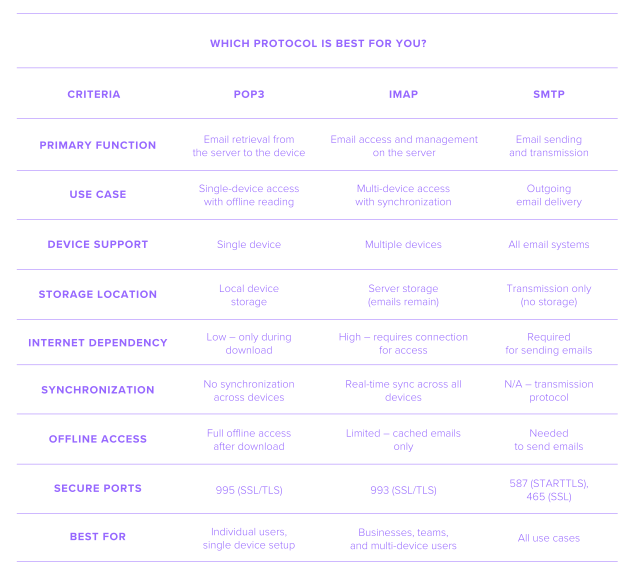
If you’re still undecided, we’ve put together a handy table to help you make the best decision for your needs.
You’ll find the specific criteria down the left-hand side and the different protocols across the top.
Bottom line
Email protocols can make a big difference to your email experience. When taken seriously, they offer a lot of flexibility for your needs.
Plus, once you’ve decided on the proper setup, there’s always the chance to go deeper with extra layers of security, especially if you’re a small business looking to secure your email.
Ultimately, all this requires an email client that meets your needs in terms of customisation.
If email plays a big role in your life or business, it’s worth taking seriously. Check what your provider offers, and if it doesn’t meet your needs, find one that does.
Frequently asked questions
POP3 and IMAP are types of email protocol used to receive messages. POP3 downloads emails to your device and often deletes them from the server. IMAP keeps emails on the server and syncs them across devices.
SMTP (Simple Mail Transfer Protocol) is the standard protocol for sending email. While POP3 and IMAP handle incoming mail, SMTP transmits outgoing messages from your client to the recipient’s server. It’s a key part of protocols used in email communication.
Yes. IMAP is used to receive and manage emails, while SMTP is the email protocol used to send emails. Paired together, they work to sync inboxes and deliver messages across devices.
IMAP is usually the best email protocol for business. It stores emails on the server, supports syncing, and works well across teams.
POP3 is still used but less suited to modern workflows. This email protocol type stores emails on one device without syncing. IMAP is typically preferred today for its real-time access across multiple devices.

Suggested articles




Share your thoughts