
Nobody likes guessing whether their leave will be approved. A well-written leave request email gives your manager the details they need to make a quick decision. Done well, it shows professionalism, sets clear expectations, and helps you actually enjoy your time off. The clearer your email, the easier it is for your manager to say yes.
What is a leave application email and why does it matter?
Taking leave invites two problems: who covers your work when you’re away, and how do they know when your leave starts and ends. A well-timed leave request email solves both of these. It outlines when you’re away, why you’re away, and who should take over. Plus, you get the bonus of truly enjoying your time away without worrying whether you’ll return to a mountain of problems.
It’s usually sent to your manager, HR department, or anyone else who needs to be notified. It shows professionalism, helps with workload planning, creates a record for HR, and shows you care about your colleagues. Obviously, there are myriad reasons you might want to send one, but for simplicity, we’ve narrowed down a few below.
When to use a leave application email:
Sick leave when you’re unwell
Vacation leave for planned holidays
Personal days or casual leave
Emergencies like family illness
Parental leave for maternity/paternity
What is the proper format for a leave request email?
If you want your leave request to be accepted, it needs to land with your employer. A simple ‘Hi’ and ‘Bye’ won’t cut it – especially if you send it at the last minute. The formulas below will help you create a leave application email that looks professional, explains your absence, and gets the all-important rubber stamp of approval.
Subject lines that get your leave noticed
Want your email to grab attention? Make sure your subject line is short, specific, and straight to the point. The last thing you want is your boss calling you mid-vacation, asking where you are because your subject line was too generic and ended up getting lost in his emails. It's the first thing your boss will see, so make it count.
How to make that subject line purr
Keep it short –under 50 characters is a good aim. You don’t want half your message being cut off because you decided to turn Shakespeare on your subject line.
Specific, specific, specific – be specific with dates, e.g., “Request for leave - Jan 1 - Jan 8”. Putting your dates upfront is the best way to hedge against any misunderstandings.
Start with why– it helps to be more concrete. Add details. “Request for sick leave / Request for vacation leave.” The more your company knows upfront, the easier it will be for them to arrange.
Why your greeting could be the key to approval
A request for leave is exactly that – a request. For that reason, it’s best to dial up the formalities and keep things professional. You might be best friends with your boss or the HR person, but when it comes to moments like these, respect usually wins out. It’s the best way to make sure your request is well received, plus you protect yourself against any misunderstandings if the email is saved by HR for future reference.
What managers really look for in a leave email
Once the formalities are out of the way, it’s on to the nitty-gritty. The body of the leave application email is where you can get into the details of why you need the leave and when you plan to take it. Provide as much detail as you are comfortable with and try to be specific with the dates so that your company can prepare for your absence. Obviously, you have big shoes to fill, and they need to find someone to fill them.
That’s where a handover plan comes in. Outlining who will take over your responsibilities, which tasks are still pending, and their deadlines helps reassure stakeholders that your absence won’t create confusion. Be sure to attach any documents that will provide clarity to any outstanding projects. Adding any extra information they’ll need to stay on track can make all the difference.
And before you hit send, make sure to confirm that your request was received. This gives you peace of mind that your request has been read, gives your manager or HR a quiet nudge to respond, and protects against any misunderstandings further down the line. You can request confirmation by adding a polite line such as:
“Please confirm you’ve received this request.”
“Could you kindly let me know once this request has been received?”
“I’d be grateful for a quick reply just to confirm everything is in order with my request”
How to sign off a leave request the right way
Your sign-off is the last thing they’ll read. Keep it polite, keep email etiquette in mind, and if you want extra goodwill, add a quick thank-you for their time and consideration. Once that’s done, close with your name under a formal sign-off like ‘Best regards’ or ‘Sincerely’.When signing off a simple leave request mail to manager, it helps to have some examples ready to go. Check out the comparison table below.
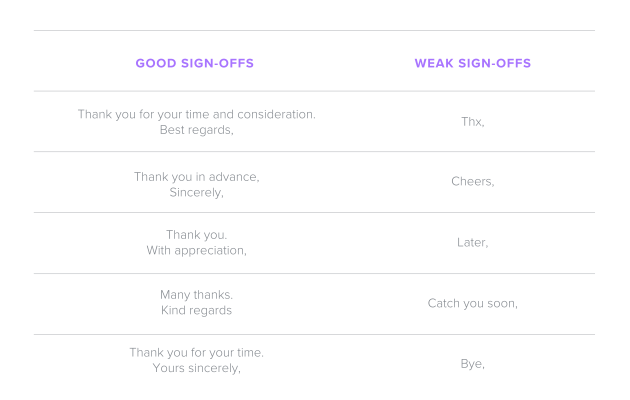
How do you write a leave application email for different situations?
When writing a simple leave request mail, understanding the format is the first step, but examples bring it to life. Below you’ll find leave request emails you can borrow from, adjust, and send with confidence.
Sick leave email example
Subject: Sick leave request – March 12–13Dear [Manager/ HR],
I’m feeling unwell and need to take sick leave on March 12 and 13 to recover. Please let me know if you need a doctor’s note or any additional details.Could you kindly confirm you’ve received this request?
Thank you,[Your name]
Casual/personal day email example
Subject: Personal day request – April 5Dear [Manager/ HR],
I’d like to take a day off on Friday, April 5, for a personal appointment. Please let me know if this works or if you need any further details.I’d appreciate a quick reply to confirm this request has been received.
Best regards,[Your name]
Vacation leave email example
Subject: Vacation leave request – July 10–21Dear [Manager/ HR],
I’d like to request vacation leave from July 10 through July 21. I’ll finish my current reports before leaving and hand over ongoing client calls to Daniel.
Please confirm that this request has been received.Thank you in advance[Your name]
Emergency leave email example
Subject: Emergency leave request – from May 2Dear [Manager/ HR],
Due to a family emergency, I need to request leave starting May 2. I’ll keep you updated as soon as I know how long I’ll be away.Could you kindly confirm receipt of this request?
Sincerely,[Your name]
Maternity/paternity leave email example
Subject: Paternity leave request – August 14–October 9Dear [Manager/ HR],
I am writing to formally request paternity leave from August 14 to October 9. Please let me know if you need any supporting documents or additional details.I would be grateful if you could confirm that this request has been received.
With appreciation,[Your name]
What are the key tips to get your leave request approved quickly?
Want your leave accepted quickly? Here’s what to do:
Get to the point– don’t drown your request in explanations. Put the key information up front and cut the rest.
Dates and handover plan – allowing your company time to adjust to your absence is key. Be specific with your dates and make sure there’s a plan in place when you’re not there.
Send in advance (except emergencies) – your company needs time to prepare for your absence, so be sure to send your email at the right time. Try to give two weeks' notice.
Offer availability if urgent – most companies won’t expect you to work on leave, but letting them know you’re reachable in an emergency can ease concerns.
How to seal your leave request for approval
You’re nearly done, but the last touches can make or break your request. From how you phrase it to how you follow up, small details shape whether your manager sees your email as easy to approve or easy to ignore. Nail these, and you’ll avoid delays, misunderstandings, or any awkward back-and-forth.
How to explain leave to your manager politely
Explaining leave to your manager is all about tone, timing, and preparation. A rushed “Can’t work tomorrow, sorry” in the middle of a meeting won’t do you any favours. Start by checking your company’s leave or PTO policy so you know what’s allowed and how much notice you’re expected to give. Coming prepared shows respect for the process and makes it easier for your manager to say yes.
From there, outline exactly when you’ll be away, give just enough detail about why, and, most importantly, show you’ve thought about the impact on your team. Managers appreciate it when you acknowledge the disruption and explain how you’ll minimise it. That might mean finishing key tasks early, handing over work to a colleague, or leaving clear notes so nothing falls through the cracks.
How to structure your email if you need recurring leave
Recurring leave, like a weekly medical appointment or a standing personal commitment, takes a bit more explaining than a single day off. The trick is to be crystal clear about the pattern and the timeframe. Spell out the dates (start and end), the frequency (every Wednesday, every other Friday), and whether it’s full days or half-days.
Recurring leave, like a weekly class, ongoing appointments, or a personal matter, needs extra clarity so your manager can plan around it. Keep your email short but specific: explain the pattern (weekly, bi-weekly), set clear start and end dates, and outline how you’ll manage your responsibilities while away.
What to include in your recurring leave email:
Add a clear subject line with recurring leave and dates
Keep the reason brief and professional
Spell out frequency, duration, and start/end dates
Include a handover plan for tasks
Confirm you’ve checked the leave/PTO policy
Close politely and ask for confirmation
No response? Here’s your next move
Sometimes your leave request email gets buried, overlooked, or maybe your manager had a busy day and forgot to reply. If you haven’t heard back after a reasonable time, typically 2–3 business days, a polite reminder is your next move.
Your follow-up email should be short, friendly, and to the point. Start with a greeting, mention your previous email, ask if they’ve had a chance to look over it, and politely note why a timely response matters. Then, include a clear, simple ask: “Could you please confirm whether my leave request has been approved?” Finish with a courteous sign-off and a thank you.This works much the same way as a thank-you note after an interview. It reminds them you exist and helps you end on a positive note. It’s a good idea not to flood their inbox. Send just one or two follow-up emails, spaced a few days apart. If you still don’t hear back after that, consider nudging them in person, or loop in HR if necessary.
Frequently asked questions
A leave application email is a professional way of informing your manager or HR that you need time off. It includes the dates, the type of leave, and a short explanation of the reason. It creates a clear record and makes planning easier.
A standard leave application format includes: Subject line with type of leave and dates Greeting (to your manager or HR) Body with dates, brief reason, and a handover plan Polite closing and signature
In a leave request email to manager, it’s best to be direct and respectful. Mention your exact dates, the type of leave, and how you’ll manage your responsibilities. Keep the tone professional, thank your manager for their understanding, and ask for confirmation.
Send your email for leave request as early as possible, ideally at least two weeks before planned leave. For emergencies, send it immediately with as much detail as you can.
If you don’t hear back within 2–3 business days, send a polite follow-up. Reference your original request leave email, explain why a timely reply matters, and ask clearly for confirmation. Limit follow-ups to one or two before trying another channel.
Yes. If you need recurring leave (e.g., every Friday for two months), state the pattern, start and end dates, and how you’ll manage your work. Clear details in your leave letter to manager will avoid any back-and-forth later.

Suggested articles




Share your thoughts