
You receive a call from an unknown number. You usually ignore them, but you're waiting to hear from a new supplier. The voice sounds official, professional: "Hi, am I speaking with Noah Williams?"
Without thinking, you respond, "Yes."
“Thanks for confirming. I'm calling from Chase Bank's fraud department. We've detected some suspicious activity on your account. Can you confirm your phone number for me?”
You recite your number.
"Got it, thanks. One more thing, I'm going to send you something about this. Is your email still @gmail.com?"
"Yeah, that's right."
Through those confirmations, you’ve just given a scammer three critical pieces of information: your voice pattern, phone number, and email. Within hours, they can clone your voice and potentially access your accounts.
Data breaches have already exposed millions of phone numbers on the dark web, making it easier than ever for criminals to target you.
While there's no silver bullet solution against fraud, protecting your accounts requires multiple layers of security. A Virtual Private Network (VPN) provides essential protection by encrypting your online activity and securing your data.
Let's explore the cyber threats facing small businesses today, and how a comprehensive security approach, including a VPN, can help protect your livelihood.
Cyber security threats targeting small business owners
No single security solution could have prevented that voice scam. But this type of attack often leads to something more sinister—cybercriminals using your information to authorise wire transfers or manipulate your contacts.
Your personal information is already out there. Serial data breaches have exposed millions of phone numbers and email addresses, which arebought and sold daily on the dark web for just a few pounds.
Small business owners are particularly vulnerable to scams because they often work remotely on public Wi-Fi, which isn’t as secure as a regular office environment.
While multi-factor authentication (MFA) protocols can help protect you against direct attacks, a VPN provides an essential layer of security for everyday tasks.
By creating an encrypted tunnel for your internet traffic, a VPN makes it almost impossible for criminals to intercept your data, even if they’ve already swiped your personal details off the dark web.
Business VPN features that protect your data
When you're running a business solo, you need security that works as hard as you do. Here are the key VPN features that can protect your livelihood:
Encryption shield
A VPN automatically applies data encryption to your internet traffic. Whether you're processing payments, checking emails or accessing files, anyone tapping into your public Wi-Fi will only see scrambled code. Just click connect and you're instantly protected.
Automatic Kill Switch
Kill Switch immediately cuts your internet connection if your VPN drops. So if you're buying goods or transferring funds to suppliers, you can do so, knowing your credit card details are not exposed. It's your always-on security guard.
Split tunnelling technology
With this smart feature, you can choose exactly which traffic needs protection. For example, you can keep your banking transactions secure through the VPN, while routing less critical traffic like Spotify or Netflix through your Wi-Fi connection. This maximises both security and speed where you need it most.
Privacy protection
As a VPN for remote workers, this solution lets you hide your IP address and access geo-blocked sites to maintain business continuity whenever you travel.
Paid VPNs can also help you meet data protection laws like GDPR and HIPAA by encrypting customer information, from payment details to personal data. These regulations require businesses to secure customer data during storage and transmission—even small companies face penalties for non-compliance.
Your VPN's encryption satisfies these requirements by creating a secure tunnel for all customer data flowing through your network.
Now let's examine how to implement these security features in minutes, not hours.
Setting up VPN protection for your business
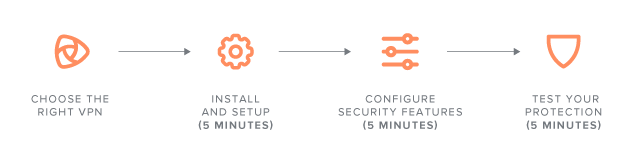
Protecting your business with a network security solution doesn't take long. Here's your step-by-step guide:
Step 1:Choose the right VPN
Look for strong encryption standards
Verify their “no-logs” policy
Check out the customer support team
Avoid free VPNs as they often sell your data
Step 2: Install and set up (5 minutes)
Download the VPN app to your devices
Install on both your laptop and phone
Sign in with your account details
Select 'auto-connect' in settings
Step 3: Configure security features (5 minutes)
Enable Kill Switch
Set up split tunnelling for your: Business apps (banking, email, cloud storage), payment processing platforms, and client management systems
Leave Netflix, Spotify, and video browsing running on your regular connection
Step 4: Test your protection (5 minutes)
Confirm VPN connects automatically
Verify if Kill Switch works
Check split tunnelling routes
Test connection speed
Remember: A strong VPN protects your business 24/7, but only if you keep it running. Set it up once, and it works silently in the background while you focus on your day-to-day.
Advanced VPN features and troubleshooting
As your business grows, you may need to optimise your VPN settings. Here are essential advanced features for common issues:
Optimising your connection
If your VPN is running slowly:
Connect to servers closest to your location
Update your VPN application to the latest version
Check that split tunnelling is properly configured
Verify your base internet connection speed
Enhanced security features
Double VPN routing for extra-sensitive transactions
Custom DNS settings to prevent data leaks
Network lock to ensure no unprotected connections
Automatic Wi-Fi protection for new networks
Common issues and solutions
If your VPN won't connect:
Choose another protocol
Try a different server location
Restart the VPN
Contact support if issues persist
If your connection drops:
Enable Kill Switch
Update your VPN app
Check your internet stability
Consider changing server locations
While these technical tips can help secure your business, they're just one part of a larger threat landscape. Let's return to that chilling phone call...
Future-proofing your business
Remember that phone conversation where you gave away your private information to a snake oil salesman? In 2025, that's all it takes to set a devastating chain of events in motion. When your personal details are sold on the dark web, it becomes a digital skeleton key, unlocking pathways to your business assets, client details, and bank accounts.
You see, criminals aren't just collecting random data. They're piecing together forensic portraits of lucrative targets, particularly small business owners who often lack enterprise-level protection.
Every leaked phone number, compromised email address becomes another stroke in their canvas. Once they have enough components, they can launch attacks that can wreck your finances and more.
Here's what you need to remember:
Layer your security correctly
Combine your VPN with strong verification protocols and multi-factor authentication
Keep your VPN running whenever you're online—prevention is easier than recovery
Stay alert for suspicious calls or emails, even when using a VPN
Ensure customer data compliance with local security laws
Make your security a daily habit
Enable your VPN before accessing any business or financial applications
Use split tunnelling to protect sensitive transactions while maintaining speed
Keep your security tools updated—criminals are constantly evolving their tactics
Ensure Kill Switch is active before processing payments or accessing banking
Protecting your business data with VPN security
In 2025, a data breach isn't just about losing money—it's about protecting your future. When criminals combine stolen personal information with unprotected internet traffic, they can ransack your accounts in minutes. With a VPN, you have an additional layer of security that acts as a barrier between your sensitive data and those looking to exploit it.
Criminals are continually evolving through AI, but the fundamentals remain the same: encrypt your internet traffic, protect your data, and never assume you're too smart to be scammed.
Your business's future depends on securing it today.

Suggested articles




Share your thoughts