
To achieve online success as an ecommerce business, you need a way to manage your products, and all the content around them.This is where an e-commerce CMS comes in. If that just sounds like another techy acronym to you, don’t worry. In this blog, we’ll walk through what an e-commerce CMS is, what features to look out for, and which platform offers the best cms software for e-commerce
What is an e-commerce CMS?
An e-commerce content management system (CMS) allows you to manage everything involved in building and maintaining an online store.
This can include web hosting, managing content such as product images and descriptions, integrating payment gateways, and handling tasks like SEO to attract the right online audience. They differ from traditional CMSs in that they have feature specific to doing business online.
How an e-commerce CMS supports online businesses
A CMS for e-commerce gives you the flexibility to sell your products online, while managing inventory, pricing, marketing, and analytics to help boost conversions. It also enables you to build layouts that are both user-friendly and visually aligned with your brand.
As your online store becomes more popular, your e-commerce CMS should be scalable enough to handle increased traffic and transactions without compromising performance.
Key features to look for in an e-commerce CMS
Each e-commerce CMS on the market has unique functionality and is built for different needs. However, when looking around for the right software, look out for the following key features.
Easy product management
Product management is essential for any online store. You need to keep track of your stock levels to avoid disappointing online shoppers, that could create a bad experience that leads a shopper to look elsewhere.A good e-commerce CMS will help you maintain a digital record of your inventory and automatically mark items as out of stock when levels reach zero.
It should also provide tools for organizing products into categories so that users can easily find what they’re looking for. A drag-and-drop builder can help streamline this process, allowing you to manage your product layout without technical skills.
Customisable design and templates

The way your e-commerce website is designed is crucial to the success of your online business.Clean, professional-looking, and navigable pages with high-contrast colors and clearly marked elements leave a good impression on visitors. This helps build positive bias, and increases the likelihood of a shopper sticking around to complete a purchase.
Good design also instils trust, which is essential for retaining online shoppers. Customers need to feel confident that your site is secure and reliable before they’re willing to share their payment details, and a well designed site can help tip them in the right direction.
Luckily, e-commerce CMSs make website design simple. Most platforms come with a wide range of customisable templates, allowing you to match your brand’s look and feel without writing a single line of code. Many e-commerce CMS platforms let you customise your pages the way you want using drag-and-drop functionality.
Many modern CMSs even offer AI-powered design tools that can build fully functional websites in minutes—based on just a few prompts.
Secure payment gateway integration
You can’t make money from your e-commerce website if customers can’t pay you. That’s why it’s essential for your e-commerce CMS to integrate with secure and reliable payment gateways—such as Stripe, Apple Pay, Google Pay, or PayPal. These platforms allow for fast, frictionless transactions and give users the confidence that their payment information is safe.
Trust is everything in online shopping. When customers feel secure during the checkout process, they’re far more likely to complete a purchase. Your CMS should support trusted payment options and provide a smooth, professional experience that assures users they’re buying from a legitimate business—not a scam.
SEO and marketing tools
Online businesses can benefit enormously from strong SEO. Good search engine optimization connects the right users with your products, increasing visibility and driving organic traffic to your store. That’s why it’s important to choose an e-commerce CMS that helps you manage SEO effectively.
When evaluating CMS platforms, look for SEO tools that support:
Keyword management to help align your content with what potential customers are searching for.
Image alt text and meta description editing to improve accessibility and click-through rates.
Proper header hierarchy, making it easier for search engines to understand your page structure.
Internal linking and backlink tools to enhance navigation, improve discoverability, and keep users engaged longer.
Performance tracking features like page speed analysis and mobile responsiveness optimization.
Some e-commerce CMSs offer these features out of the box, while others provide them through plugins or integrations.
Scalability for business growth
Your CMS should support the growth of your online business—not hold it back.That’s why it’s important to choose a platform that can scale with you over time. Look for a CMS that offers flexible web hosting, allowing you to expand your resources as your website traffic and transaction volume increases.
Scalability can also come in the form of plugin and integration support. As your business grows, you may want to connect your CMS with more advanced tools for inventory management, marketing automation, customer service, or analytics. A good CMS should make it easy to add these features without starting from scratch.

Omnichannel capabilities
Your website isn’t the only place customers interact with your brand—but it should be the central destination where they engage with your products and content.
A strong e-commerce CMS with omnichannel capabilities enables you to manage and distribute consistent product and marketing content across multiple customer touchpoints, such as your website, mobile app, email campaigns, and digital displays—all from one central platform.
Rather than managing each channel separately, this approach ensures that your content stays accurate, on-brand, and up to date—regardless of where customers encounter it. The role of the CMS is to unify your product and promotional content, making it easier to scale your messaging across platforms.
For example, you can update a product description once in your CMS and have that content appear correctly on your online store, in your mobile app, and in a promotional email—ensuring consistency and reducing manual effort.
Content and media management
Your content is the foundation of your e-commerce website. Text and images work together to help users understand what they’re seeing, and encourage them to take action.A good CMS lets you manage large image libraries, organize product visuals, and build landing pages or blog content that draws in the right audience. Whether you're promoting a seasonal sale or sharing product tips, your CMS should make it easy to publish compelling, conversion-focused content without technical hassle.
Third-party app integrations
A successful e-commerce website depends on a complex ecosystem of tools and applications working together behind the scenes. This might include a CRM to manage customer relationships and marketing, an email platform to nurture buyers and build awareness around your brand, and shipping software to ensure products reach customers smoothly after purchase.
That’s why it’s important to choose an e-commerce CMS that integrates easily with a wide range of third-party apps. This can help you streamline operations, reduce manual work, and create a more cohesive experience—for both your team and your customers.
Best CMS for e-commerce in 2025
So, which CMS is best for e-commerce? Let's take a deeper dive into some of the best CMS platforms for e-commerce.
WordPress with WooCommerce
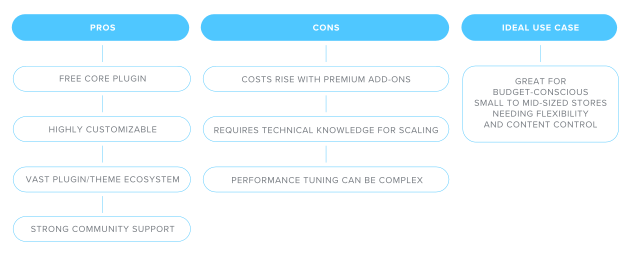
WooCommerce is a powerful, open-source eCommerce platform for WordPress. It allows users to turn their WordPress websites into fully functional online stores.It’s a highly customizable platform, with an extensive library of themes, plugins and add-ons, including payment gateways and SEO tools. Other features include:
Unlimited products and variations.
Multi-currency, multi-language, and tax automation via plugins.
Choose your hosting provider, scale your store, and modify the code however you want.
Whether you're launching a simple store or building a complex online retail experience, WooCommerce provides the tools needed to grow and adapt your business.The core plugin is completely free, making it a cost-effective option for those starting out. It also boasts strong community support, with an extensive library of guides, forums, and tutorials to help troubleshoot issues and optimize store performance.Although the platform is highly flexible, customizing and scaling it to meet growing business needs can be complex. You may require technical expertise or the support of a developer over time.
Shopify
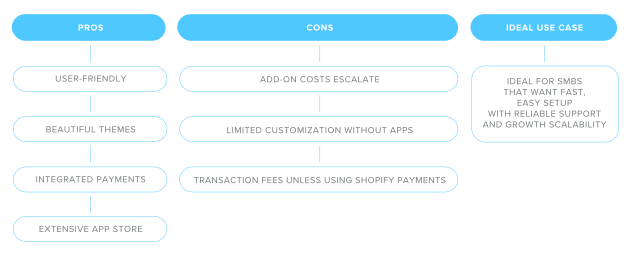
Shopify is a leading content management system (CMS) designed specifically for e-commerce, making it a popular choice for small businesses looking to sell products or services online.It offers a broad range of professionally designed themes and an intuitive drag-and-drop interface, allowing users to build and customize their online store without the need for coding skills.One of its strongest features is the integrated payment system, which simplifies the process of accepting payments and managing transactions. Its app ecosystem also allows for extensive functionality, covering everything from marketing and SEO to customer service and shipping logistics. Other features include:
Drag-and-drop interface with customizable themes.
Manage multiple product variants, stock keeping units (SKUs), stock levels, and shipping rules.
Built-in support for digital products, subscriptions, and bundling.
However, Shopify’s versatility comes with a trade-off. As businesses scale or look to add more features, costs can rise quickly—especially when relying on third-party apps for essential tools like inventory management or automated customer engagement.
BigCommerce
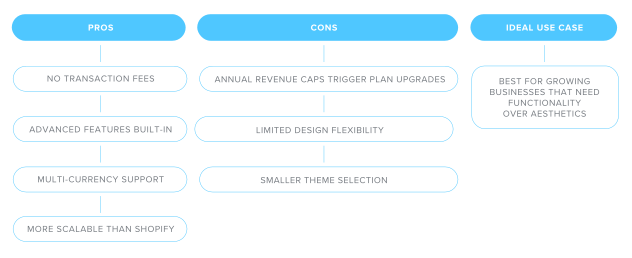
BigCommerce is a comprehensive, fully hosted e-commerce platform built to support growing online businesses with robust functionality. It offers a solid set of built-in features right out of the box, including:
Multi-currency selling
Flexible payment gateway options without transaction fees
Straightforward drag-and-drop page builder.
Compared to some other platforms, BigCommerce delivers more advanced capabilities at a relatively lower cost, making it an attractive option for small to mid-sized businesses that anticipate scaling over time.
However, the platform enforces annual sales thresholds that, once exceeded, push merchants into more expensive plans—something to keep in mind for fast-growing stores.While functional, the design customization options are somewhat limited. The selection of themes is narrower than competitors, and there’s less flexibility when it comes to tweaking fonts or layouts without diving into code.
Magento (Adobe Commerce)
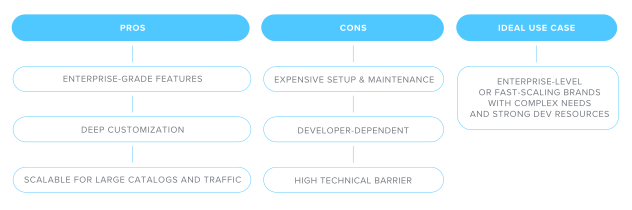
Adobe Commerce, formerly known as Magento, is a powerful open-source e-commerce platform tailored for enterprise-level businesses or fast-growing brands with complex needs.Known for its scalability and flexibility, it offers a vast suite of built-in features covering everything from SEO and marketing to payment processing and advanced catalog management. Its open-source nature allows for deep customization, making it ideal for businesses that want complete control over their storefront's functionality and user experience.
However, with that power comes complexity and cost. Adobe Commerce typically requires the expertise of developers to build and maintain, especially for more advanced customizations.On top of that, expenses for hosting, third-party plugins, and ongoing maintenance can add up quickly. While it’s a strong solution for businesses ready to invest in a robust, tailored e-commerce presence, it’s less suitable for smaller teams or those looking for a plug-and-play platform.
Strapi + Custom Frontends (Headless CMS Option)
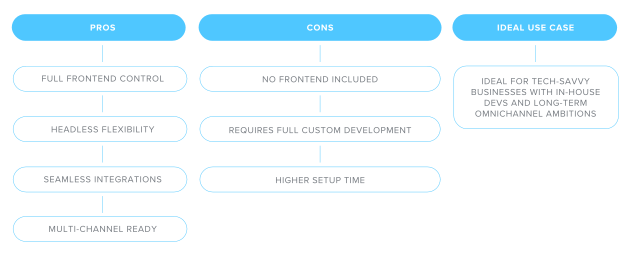
Strapi is a headless CMS that gives tech-savvy businesses the freedom to build a fully custom e-commerce experience from the ground up—without having to develop a backend from scratch.It handles e-commerce content management, letting you create and organize product information, promotional content, blog posts, and localized versions of your site, all from one place.Unlike traditional e-commerce platforms, Strapi doesn’t include a frontend—you pair it with tools like Next.js or Nuxt.js to design and build the storefront exactly how you want it.
Strapi is ideal for growing or complex businesses needing full control. It integrates easily with tools like Shopify, Stripe, PayPal, and third-party APIs, letting you manage content and commerce from one backend and deliver across web, mobile, or other platforms.
The tradeoff? You build everything from scratch on the frontend. It’s powerful and flexible—but best suited to teams with dev resources and a long-term vision.
Hygraph
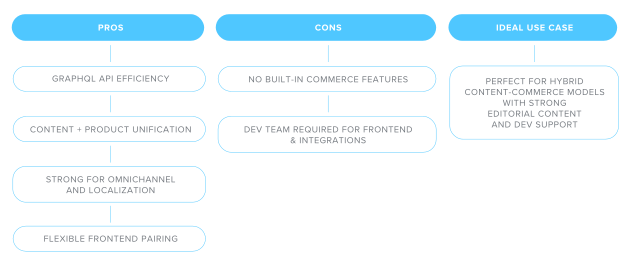
Hygraph is a modern headless CMS built with flexibility in mind. It’s great for managing product catalog data like titles, images, inventory, and descriptions—by integrating seamlessly with your existing e-commerce tools, such as Shopify, ERPs, payment gateways, search engines, and personalization platforms.It’s great for businesses that want to deliver rich, consistent content across websites, apps, and even in-store screens. It’s especially useful for blending product content with storytelling or managing content across regions and platforms.
However, it’s not an all-in-one e-commerce solution. You’ll need to build the frontend and connect tools for things like payments and order tracking. For teams with development resources, it offers excellent control and flexibility—but may be too complex for smaller teams or quick launches.
Prestashop
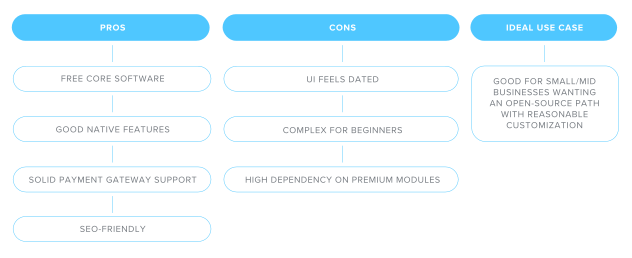
PrestaShop offers a flexible, budget-friendly way to launch an online store. It’s free to use and includes essential features like inventory tracking, SEO tools, and support for major payment gateways like PayPal and Stripe.
You can expand its capabilities with add-ons, though many advanced features and polished designs require paid modules—which can increase costs over time.
It’s a solid option for small to mid-sized businesses, but the setup can be unintuitive, and design customization is less flexible than on newer platforms. Ideal for teams willing to invest time in learning the system.
Drupal
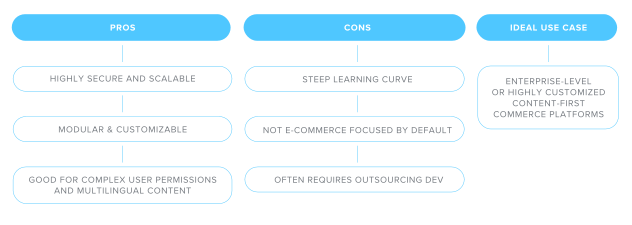
Drupal is a powerful, open-source CMS known for its flexibility, scalability, and strong security features—qualities that make it a solid foundation for complex websites.When it comes to e-commerce, Drupal doesn’t offer a dedicated commerce engine out of the box but excels as a customizable framework that integrates well with API-based e-commerce platforms.This makes it particularly suitable for large companies that require tailored, feature-rich digital experiences and have the technical resources to support them..
That said, Drupal has a steep learning curve. Without prior coding experience or access to skilled developers, the platform can be difficult to work with.
OpenCart
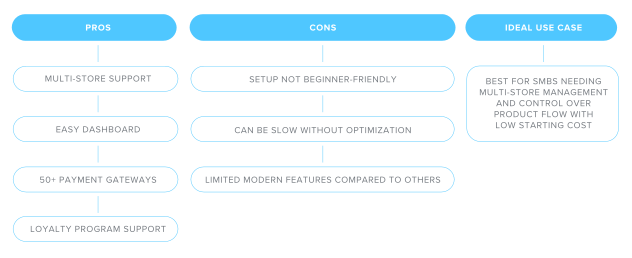
OpenCart is a lightweight, open-source e-commerce platform that offers a user-friendly dashboard and solid flexibility for small to medium-sized businesses.One of its standout features is multi-store support, which allows you to manage several online stores from a single admin panel—ideal for businesses with multiple brands or regional storefronts. The platform includes tools for:
Managing product categories
Setting up promotions and discounts
Offering loyalty points to returning customers.
It also supports over 50 payment gateways out of the box, making it adaptable to various customer payment preferences.
The system is relatively easy to navigate once installed, and many users appreciate its clean interface and built-in reporting tools that help track sales and performance. Technical support is also available for those who need extra assistance, either through the community or via dedicated paid support options.
However, OpenCart is not without its drawbacks. The installation process can be complicated for users without technical experience, and the platform has a reputation for slower loading speeds if not optimized properly.
👉 CMS Comparison Table
|
Headless CMS vs traditional CMS for e-commerce
As e-commerce continues to evolve, so do the tools we use to manage online stores.Traditional CMSs have long been the go-to for building websites, offering an all-in-one package where content, design, and backend functionality live under one roof.But a new breed of CMS, called headless CMS, is gaining traction, especially among e-commerce businesses that want more control and flexibility.
So, what exactly is a headless CMS? And how do you know if it’s the right fit for your online store? Let’s take a closer look.
What is a headless CMS?
A headless CMS is a content management system that separates the backend (where you create and manage your content) from the frontend (how that content is displayed to users).Instead of dictating how your website should look or function, a headless CMS for e-commerce gives you the freedom to build your own custom storefront using modern development tools.
Content from a headless CMS is delivered via an API, which means you can publish it anywhere—on a website, mobile app, digital kiosk, or even a smartwatch. The key difference is flexibility: you’re not locked into using the same templates or layout rules that come with a traditional CMS.
For businesses that rely on content to sell products—such as detailed product guides, blogs, or promotional landing pages—this separation can be a powerful advantage.
Advantages for e-commerce
One of the biggest reasons brands turn to a headless CMS for e-commerce is performance.Because the frontend and backend are decoupled, your website can be optimized for faster loading times, smoother interactions, and improved performance across devices. A faster website improves user experience and helps your site rank better in search engines.
Flexibility is another key benefit. With a headless CMS, you can design a storefront that matches your brand vision, rather than trying to make your business fit into the limitations of a pre-built theme.Whether you’re showcasing products through a shoppable lookbook, launching a global storefront in multiple languages, or integrating a loyalty program, a headless setup allows you to do it your way.
Headless CMSs also support omnichannel selling, which is increasingly important for modern retailers. With content stored centrally and distributed via APIs, you can share consistent product information across your website, mobile app, email campaigns, and even in-store screens.
Is a headless CMS right for your store?
While a headless CMS offers a lot of benefits, it’s not the right fit for every e-commerce store. The decision depends largely on your business size, goals, and resources.
For larger or fast-growing businesses with in-house development teams, or access to a reliable agency, headless CMSs offer creative freedom and scalability. If you’re aiming to create a branded, content-rich storefront that goes beyond a standard product listing page, a headless setup gives you the tools to do so.
However, if you're a small business or solopreneur with limited time, budget, or technical know-how, the additional complexity of a headless CMS can be a barrier.Unlike traditional CMSs that come with pre-designed templates and built-in features, headless platforms require you to build the frontend from scratch and integrate third-party tools for things like checkout, inventory management, and analytics.
That said, if you’re planning for long-term growth and want to invest in a flexible, future-proof system, it may be worth working with a developer to get started. A headless CMS gives you more control over how your store looks, behaves, and scales—but that control comes with a steeper learning curve and a higher up-front investment.
How to choose the right CMS for your e-commerce store

Business size and growth plans
Consider your business’s current size and growth goals. Having a clear idea of where you are now, and where you want to be, will help you choose an CMS for e-commerce that aligns with your goals.
It will also guide the technical side of things, like web hosting. If you expect to scale up over time, you’ll need a CMS that supports hosting solutions, like shared hosting, that are capable of growing with you. Your e-commerce website needs to be able to handle increased traffic, product listings, and transactions without slowing down.
Budget considerations
How much are you willing to spend? Your budget will naturally vary depending on whether you’re running a side hustle, launching a startup, or managing an established business.The costs associated with a CMS for e-commerce can add up quickly—especially when you factor themes, plugins, third-party apps, and potential developer support.
That’s why it’s important to set a clear budget from the start and understand exactly what your ongoing expenses will be. Knowing your limits helps you choose a platform that fits your financial situation without compromising on the features you actually need.
Technical skills available
If you’re not confident with the technical side of setting up a WordPress e-commerce site, a managed hosting solution like EasyWP can help. It comes with WordPress pre-installed, free SSL, automatic backups, and 24/7 support—making it one of the fastest and easiest ways to get started, even if you're not a tech expert.
Customisation vs. simplicity
At some point, you may need to weigh your need for customization against your need for speed and simplicity.Customization is important if you want to reinforce your brand, create bespoke checkout flows, launch your own apps, or integrate tools you're already using.However, building a fully customized e-commerce website or CMS takes technical knowledge—and usually requires outside help. That can stretch your budget further than you might expect.
On the other side of the scale are drag-and-drop builders and AI tools that let you handle the basics of website design yourself. These are great for getting a professional-looking site live quickly, but they come with limitations when it comes to deep customization.
One option is to start with a simpler, more affordable solution to get your business off the ground. Once you’re established and attracting customers, you can invest in more customization as your needs and resources grow.
SEO, marketing, and analytics
Marketing is essential for e-commerce success. It not only promotes your products but also helps you understand what customers engage with, so you can optimize for higher profits. Fortunately, most e-commerce CMS platforms include built-in marketing tools to support this.
SEO tools help improve your visibility in search results by boosting site performance, accessibility, and keyword targeting to match your products with what people are searching for.
Analytics are just as important. Being able to track clicks, views, and user behavior makes it easier to refine your site and increase sales. Look for a CMS with built-in analytics or support for easy plugin integration.
Finding your perfectCMS for e-commerce
Choosing the right e-commerce CMS comes down to understanding your business needs and finding a platform that supports your goals. Whether you prioritize ease of use, design freedom, scalability, or marketing tools, there’s a solution out there to match.
Focus on the features that matter most—like SEO, product management, multichannel selling, or customization—and weigh them against your team’s technical skills and growth plans.
Ready to launch? Explore CMS-ready hosting with Spaceship—built for speed, simplicity, and e-commerce success.
FAQsWhat CMS is best for e-commerce beginners?
WooCommerce is a top choice for beginners because it turns WordPress into a flexible e-commerce management system. It is easy to use, highly customizable, and supported by thousands of plugins and themes. If you want the best CMS for e-commerce with full control and lower startup costs, WooCommerce is a great place to start.
Can I migrate my existing store to a new CMS?
Yes, you can migrate your store to a new CMS for e-commerce. Tools and services are available to move your products, customers, and order data. Whether switching to Magento CMS for e-commerce, HubSpot CMS for e-commerce, or a headless CMS for e-commerce, proper planning ensures a smooth transition.
Is WordPress a good CMS for e-commerce?
Yes, WordPress with WooCommerce is one of the best CMS platforms for e-commerce. It offers strong content management, e-commerce features, SEO tools, and full site control. It is ideal for businesses that want a customizable, scalable online store.
What’s the difference between an e-commerce CMS and a regular CMS?
A regular CMS manages content like blogs and pages. An e-commerce CMS or e-commerce content management software also handles product listings, inventory, payments, and checkout. Platforms like Magento CMS for e-commerce are built specifically to support online stores.
Should I choose a headless CMS for my online store?
A headless CMS for e-commerce gives you maximum flexibility and faster site performance by separating content management from the storefront. It is best for growing brands with technical resources. If you need easier setup, a traditional e-commerce content management system may be better at first.

Suggested articles




Share your thoughts