
Your email signature is the last thing someone sees before they hit reply. It's small, but it can make the difference between a good impression and a forgettable one.
If that matters to you, read on.
What is an email signature?
An email signature is a block of text that sits at the bottom of every email you send. At its simplest, it's your name, title, and a way to get in touch. At its most polished, it carries your company branding, colours, and design, and is a key part of sending a good professional email.
The job it does is straightforward. It looks professional, reinforces your brand, and makes it easy for people to reach you.
What should you include in a professional email signature?
For a work email signature to show off your company and help people get in touch, it needs to tick a few boxes. There are 'must-haves', and there are "nice-to-haves". Either way, the goal doesn't change: promote your brand through professional emails and help customers reach you.
To do that properly, every signature needs the basics covered. Include your full name, job title, company name, phone number, and website. From there, social media links and a brand logo are worth adding if you have them.
Must-haves:
Full name
Job title
Company name
Phone number
Website
Nice-to-haves:
Social media (Facebook/ Instagram/LinkedIn)
Brand logo
15 email signature examples for different use cases
It's always easier to create signatures for email if you have a huge treasure trove of signature examples to pick from. Well, here you go.
Professional email signature examples
These are the signatures that mean business. They cover the standards most workplaces expect. If you're not sure where to start, start here.
Example 1: Simple professional signature
John Carter
Marketing Manager | YourBrand Solutions
+1 555 123 4567
yoursite.com
Example 2: Corporate email signature
[LOGO]
Sarah Mitchell
Head of Operations | Apex Corp
+1 555 234 5678
apexcorp.com
This email and any attachments are confidential and intended solely for the named recipient.
Example 3: Executive email signature
[LOGO]
James Holloway
Chief Executive Officer | Pinnacle Group
+1 555 345 6789 120 Business Ave, New York, NY 10001
pinnaclegroup.com
linkedin.com/in/jamesholloway
Business email signature templates
Whether you're a small business owner, a sales rep, or running customer support, these email signature examples are shaped around what each job actually needs from a signature.
Example 4: Small business owner signature
[LOGO]
Rachel Greaves
Owner & Founder | Bloom Bakery Co.
+1 555 456 7890
bloombakery.com
instagram.com/bloombakeryco
Example 5: Sales representative signature
Daniel Price
Sales Executive | NovaTech Solutions
+1 555 567 8901
novatech.com
📅 Book a call: calendly.com/danielprice
Example 6: Customer support signature
Emily Shaw
Customer Support Specialist | BrightDesk
+1 555 678 9012
brightdesk.com/support
We're here Mon–Fri, 9am–6pm EST
Minimalist email signature examples

These signatures strip everything back to what matters and nothing extra. If you want something that looks sharp without the design work, this is it.
Example 7: Clean text-only signature
Marcus Lee | Product Designer
+1 555 789 0123 | marcuslee.com
Example 8: Modern one-line signature
Anna Brooks · Content Strategist · YourBrand · +1 555 890 1234 · yoursite.com
Creative email signature ideas
For when you want your signature to do more than sign off. This section covers CTAs, promotional banners, and social icons that can turn a signature into a tool.
Example 9: With CTA (Book a meeting)
[LOGO]
Tom Dean
Business Development Manager | GrowthLab
+1 555 901 2345
growthlab.com 👉 Book a meeting with me
Example 10: With banner promotion
Claire Hudson
Marketing Director | StyleCo
+1 555 012 3456
styleco.com
[PROMOTIONAL BANNER: Sale on now — 20% off all products this week]
Example 11: With social icons
[LOGO]
Ryan Foster
Brand Manager | Waveline Media
+1 555 123 4567
wavelinemedia.com
[LinkedIn] [Instagram] [Facebook]
Personal email signature examples
These templates are built for freelancers, consultants, students, and remote professionals who want something polished without the corporate feel.
Example 12: Freelancer signature
Mia Lawson
Freelance Copywriter
+1 555 234 5678 mialawson.com
linkedin.com/in/mialawson
Example 13: Consultant signature
[LOGO]
David Chen
Independent HR Consultant
+1 555 345 6789
davidchenconsulting.com
linkedin.com/in/davidchen
Example 14: Student signature
Sophie Allen
BSc Marketing Student | University of Bristol
+1 555 456 7890
linkedin.com/in/sophieallen
Example 15: Remote professional signature
Jake Morrison
UX Designer | RemoteFirst Studio
+1 555 567 8901
remotefirststudio.com
🌍 Based in Lisbon, Portugal | Available GMT
Email signature format best practices
After looking through those examples, you're ready to put your own together. Here's how to create a proper email signature, and what to leave out.
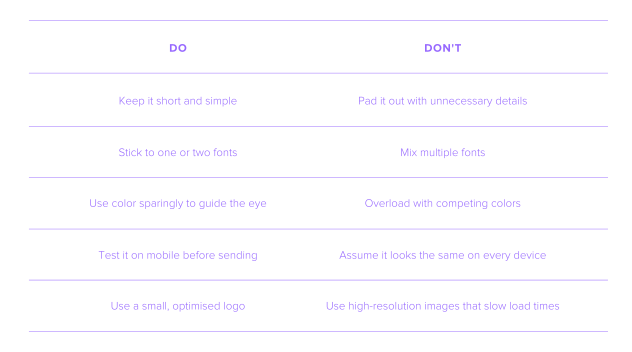
Short and sweet – Long email signatures hoover up attention away from your email. Keep it simple so the reader can quickly find what they need and get in touch.
Easy on the fonts – An email signature should advertise your fantastic business. Too many fonts will have the opposite effect. It screams unprofessional and tacky.
Limit colors – Colors are another attention vacuum. Your job is to guide the reader through your email and on to the all-important contact info. A blinding maze of colors will make that difficult.
Optimize for mobile – It's 2026, and mobile phones are king when it comes to email opens. To avoid a hideous, misaligned email, keep your email signature simple and test it on different devices.
Avoid large images – Thinking of including your fancy new high-resolution logo? Hold up, because it might put the brakes on your load times and even flag your email as spam.
Email signature do’s and don’ts
How to create an email signature in Spacemail
If this all seems mighty complex, you can create an email signature with Spacemail in a few simple steps.
Open Spacemail Webmail, go to Settings, and click Manage signatures on the Signature tile.
Tap + New signature, enter a name (e.g. "signature1"), and press Enter.
Type your signature in the text editor, adjust the font, size, and color, insert images or links, and more.
Tap the checkmark below the editing field to set it as your default signature, and you're done.
Frequently asked questions
A professional email signature format is name, title, company, phone, website, in that order. Keep it to three or four lines, one font, and minimal colour. An email signature design that's clean and easy to read will always outperform one that tries to do too much.
Short is best. Four to six lines is the sweet spot. If someone has to scroll past your signature to find the reply button, it's too long.
Only if it's worth clicking. A LinkedIn profile or a business Instagram makes sense. A personal Facebook page doesn't. If the account is active and professional, include it. If it isn't, leave it out.
Yes, but keep the file size small. A large image will slow down load times and can trigger spam filters before your email even arrives.
A good professional email signature example looks something like: your full name, job title, company name, phone number, and website. That's the baseline. From there, a logo and social links are worth adding if they're relevant.

Suggested articles




Share your thoughts